Updated October 21st, 2026
Don't care about an explanation? Skip to Mesh Repair.
To slice a mesh, mslicer effectively (this is a big over-simplification!)1 uses a ray-cast in the +X direction at every voxel to determine if it is inside the volume defined by the mesh. Interior voxels are colored white (255) and exterior voxels black (0). If a mesh has a hole in it, or a face with flipped winding order2, it's possible for the raycast return an unexpected result.
When you load a mesh, if holes are detected a 'Defective Mesh' warning will be shown. This does not mean that slicing will result in defects, but it could be possible. If the defective region is small (sometimes infinitesimally)3 the mesh may be reported as defective, but it is unlikely that the raycast would actually intersect with that region.
Consider this simple example mesh, I've highlighted two faces in red and green. Currently the mesh is not defective and will slice perfectly fine, but if the red or green face were to be deleted from the mesh there would be a hole. So... lets see what would happen if you were to slice this mesh with each highlighted face removed.
Note that removing either face will trigger the defective mesh warning.

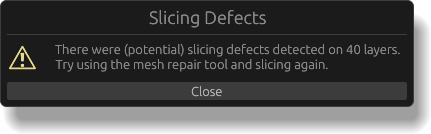
After slicing this mesh with the green face removed mslicer shows the following popup, warning of slicing defects. Looking at the slice preview, (as the popup warns) the last 40 layers have a slicing defect (also shown below, compared to the unmodified mesh).

If we remove the red face, it actually slices completely fine! That's because the raycast is done in the +X direction, parallel to the XY plane and the missing red face (in this orientation is) also parallel to the XY plane. If the mesh was rotated you could encounter defects.
Hope that makes sense!
In order to slice a defective mesh, the defects must be removed with a mesh repair tool. mslicer has a basic one built in, accessed by selecting the defective model then clicking 'Mesh › Repair' in the Models panel.
If that don't fix the issue, you can try an external tool. I have generally had better luck with the paid tools (they have free trials), but you will need to experiment a bit to see which tools are able to fix your specific mesh.
Slicer Workings
mslicer dosn't actually run a raycast for each voxel. It finds the intersection of your models with the slicing plane, which returns a 2D polygon. It then matches up the volume entry and exit points for each scan line (pixel Y coordinate) and emits runs of pixel values between them.
Winding Order
Mesh faces are just lists of three points in 3D space. In order to know if some point is inside a mesh in the case of self-intersecting meshes, the 'ray cast' returns the facing direction of the face it hit. That direction is perpendicular to the face, but its sign is specified by the order of the points in the face's list. If the software that wrote your mesh used the opposite winding-order convention, you can use the 'Mesh › Flip Winding Order' button to fix it.
Duplicated Vertices
Sometimes meshes may not actually be defective but they are detected as defective because two faces reference different vertex points with the same coordinates. This is something that any mesh repair tool, including the built-in one should be able to handle (vertex welding).
 mslicer